I decided to move the blog to wordpress, as they have better support for displaying source-code.
to do this I used en excellent utility at http://blogger2wordpress.appspot.com/
If you were following me (I have no idea if anyone is) you might want to jump to http://andreascode.wordpress.com/
this will be the last post on this blog-system.
Cheers
A
Wednesday, May 06, 2009

Wednesday, April 29, 2009
Extension methods
Imho: Extension methods should reside in the same namespace as the class they are extending (even if that namespace belongs to the .Net framework or a 3rd. party vendor.) This is the easiest way to keep functionality discoverable in a large solution.
Tuesday, April 28, 2009
Shortcut your environment
The last few months I've spent a conscious effort to speed up my development. I have used resharper since version 1.5 (i think...) but have only recently found a lot of nifty stuff in it here's my favourites:
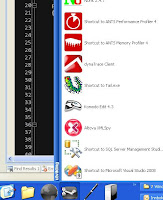
I have also used True Launch Bar for my quick menu for a long time.
having all programs I need categorized for easy access, but I started
creating shortcuts for all the relevant folders on all the relevant machines, and that's sped me up quite a bit also. To see the folder where the web project is deployed in the build environment I hover the folder icon on the toolbar which pops up a list of environments, and drill my way in like that, all the icons are easily recognizable ( i set them myself) so to find any relevant place on any environment takes me < .5 secs.
Oh, did I mention I put a shortcut to the hosts-file in there also for each machine?
I cannot recommend TrueLaunchBar.com enough. takes about an hour to set up the way I want it, but it's totally worth it
- ctrl + n = goto type (classes)
- ctrl + shift + n = goto file (web.config / language files / aspx / ...)
- Capitalized shortform (I write CMSG and r# suggests CustomerManagementServiceGateway (a class in our project) to me

I have also used True Launch Bar for my quick menu for a long time.
having all programs I need categorized for easy access, but I started
creating shortcuts for all the relevant folders on all the relevant machines, and that's sped me up quite a bit also. To see the folder where the web project is deployed in the build environment I hover the folder icon on the toolbar which pops up a list of environments, and drill my way in like that, all the icons are easily recognizable ( i set them myself) so to find any relevant place on any environment takes me < .5 secs.
Oh, did I mention I put a shortcut to the hosts-file in there also for each machine?
I cannot recommend TrueLaunchBar.com enough. takes about an hour to set up the way I want it, but it's totally worth it
Monday, April 27, 2009
Tiny drips of Asp.Net juice
long time no see,
I've been a busy little bee working on a fairly large web site for online gambling (horse races), with some SERIOUSLY cool software/frameworks. Going from the outside in it's been jQuery, EPiServer 5, Asp.Net 3.5, WCF, SOA, NHibernate. And I have learned more from this project than any other. I'm going to publish reference code (for my own later googling pleasure) from this project for quite a while I reckon. I'm starting easy with some webcontrols we have used throughout the solution. using our own has made it possible to enable/utilize jQuery very easily.
to ensure the ID of controls are fixed, we have used this little trick:
This enables us to be certain that the jQuery selectors all work as expected
similarly we have overridden labels/buttons/etc to enable us to give the webcontrols a TextKey property (e.g. TextKey="/app/game/gamewindow/buygame" ) declaratively, the TextKey is then used to lookup the correct text from the Translate function in EPiServer
As these are all just Custom Controls (no code-front file) we can specify their namespace in web.config:
I've been a busy little bee working on a fairly large web site for online gambling (horse races), with some SERIOUSLY cool software/frameworks. Going from the outside in it's been jQuery, EPiServer 5, Asp.Net 3.5, WCF, SOA, NHibernate. And I have learned more from this project than any other. I'm going to publish reference code (for my own later googling pleasure) from this project for quite a while I reckon. I'm starting easy with some webcontrols we have used throughout the solution. using our own has made it possible to enable/utilize jQuery very easily.
to ensure the ID of controls are fixed, we have used this little trick:
public class ClientIdHiddenField: HiddenField
{ public override string ClientID{ get{ return ID; } }
}
This enables us to be certain that the jQuery selectors all work as expected
similarly we have overridden labels/buttons/etc to enable us to give the webcontrols a TextKey property (e.g. TextKey="/app/game/gamewindow/buygame" ) declaratively, the TextKey is then used to lookup the correct text from the Translate function in EPiServer
public class TranslateButton: Button
{
[DefaultValue("")]public string TextKey{ get; set; }
protected override void OnPreRender(EventArgs e){
if (!string.IsNullOrEmpty(TextKey) && string.IsNullOrEmpty(Text)){
Text = LanguageUtil.TranslateOrBlank(TextKey);}
base.OnPreRender(e);
}
}
As these are all just Custom Controls (no code-front file) we can specify their namespace in web.config:
[pages validateRequest="false" enableEventValidation="false"]
(couldn't get < to work properly in markup here ...)
[controls]
...........
[add tagPrefix="cc" namespace="OurNamespace.CommonUC" assembly="OurAssemblies.Web" /]
[controls]
[pages]
Monday, December 29, 2008
VS2008 crash on "Choose items" in toolbox
So, today I was trying to include some MS Ajax control toolkit stuff on the web pages I'm building for a client. I right clicked on the toolbox, added a tab and clicked "Choose Items" then VS up and died on me. Lather rinse and repeat.
Obviously something was very wrong here. After some googling I found a solution:
- Start VS from VS command line in safe mode: devenv.exe /safemode
- Click "Choose items" again.
- be sure to click all the tabs in the dialogue
- observe an exception somewhere, and VS will disable the faulty control
- quit the safemode VS.
- restart regular VS and try again
.. VOILA!!
Obviously something was very wrong here. After some googling I found a solution:
- Start VS from VS command line in safe mode: devenv.exe /safemode
- Click "Choose items" again.
- be sure to click all the tabs in the dialogue
- observe an exception somewhere, and VS will disable the faulty control
- quit the safemode VS.
- restart regular VS and try again
.. VOILA!!
Wednesday, October 08, 2008
string.Format returns the wrong kind of whitespace
ok, this one is weird:
I write a custom util method to format money strings,
it relies on string.Format("{0:n}", someValue).
I cover it with unit tests to verify it works, and when I run them
I get this little gem:

It turns out that the whitespace returned from string.Format is character 160, whereas the whitespace you normally get is character 32.
So I change my method to replace all char 160 into char 32, and voila! all the tests pass...
what's up with that? I didn't even know there were two chars in .Net that both returned whitespace...
I write a custom util method to format money strings,
it relies on string.Format("{0:n}", someValue).
I cover it with unit tests to verify it works, and when I run them
I get this little gem:
It turns out that the whitespace returned from string.Format is character 160, whereas the whitespace you normally get is character 32.
So I change my method to replace all char 160 into char 32, and voila! all the tests pass...
what's up with that? I didn't even know there were two chars in .Net that both returned whitespace...
Sunday, August 31, 2008
changing the class item template in VS2008
It's been bugging me for too long, every bloody time I go new -> class in VS2008,
I get a class that is not set to public. I usually don't realize until I try to use the class at some later time.
Today I finally snapped and fixed it.
To change the template that is used to create new empty classes in VS2008,
- Go to
C:\Program Files\Microsoft Visual Studio 9.0\Common7\IDE\ItemTemplates\CSharp\Code\1033
- unzip the class.zip.
- change the class.cs file
- zip it back up and replace the original .zip file.
In yo face VS2008 default settings!!
I get a class that is not set to public. I usually don't realize until I try to use the class at some later time.
Today I finally snapped and fixed it.
To change the template that is used to create new empty classes in VS2008,
- Go to
C:\Program Files\Microsoft Visual Studio 9.0\Common7\IDE\ItemTemplates\CSharp\Code\1033
- unzip the class.zip.
- change the class.cs file
- zip it back up and replace the original .zip file.
In yo face VS2008 default settings!!
Thursday, August 28, 2008
useful sorting of Lists
slightly in love with ruby/rails sorting
some_list.sort_by{|person| person.age}
I went ahead and made a sort function that only takes a Generic Func as input
here goes:
public static class ListExtender
{
public static void Sort<T>(this List<T> list, Func<T, IComparable> func)
{
list.Sort((a, b) => func(a).CompareTo(func(b)));
}
}
So I can now sort for instance cards like this:
Cards.Sort(card => card.Value )
Yay!
some_list.sort_by{|person| person.age}
I went ahead and made a sort function that only takes a Generic Func as input
here goes:
public static class ListExtender
{
public static void Sort<T>(this List<T> list, Func<T, IComparable> func)
{
list.Sort((a, b) => func(a).CompareTo(func(b)));
}
}
So I can now sort for instance cards like this:
Cards.Sort(card => card.Value )
Yay!
Monday, May 19, 2008
Generic cache method
All of our code interacting with the cache is on the form
string key = "persons"
var cache = SimpleCache.Instance;
if(cache.Exists(key) && !HasExpired(Key)
{
return cache.Get(key);
}
else
{
int timeout_in_minutes = 5;
var persons = PersonDAO.GetAllPersons();
cache.Add(persons, timeout_in_minutes)
return persons;
}
---
So it's pretty tedious code to write, but relatively short and sweet. somewhat easy to introduce errors in the cache logic (which really should be the cache's responsibility after all)
I decided I would try to write one that would be easier to consume, and here is code
showing what I ended up with. The tests run as expected, I will leave it up to the reader
(if I indeed have any) to figure out how CacheFetch gets stuff done, I found it to be pretty
(yet a bit hard to grok) code that exemplifies the use of lambda-expressions and how a lambda
can access variables that were present where it was defined, in addition to those present (in the form of input params) where it is executed
--
string key = "persons"
var cache = SimpleCache
if(cache.Exists(key) && !HasExpired(Key)
{
return cache.Get(key);
}
else
{
int timeout_in_minutes = 5;
var persons = PersonDAO.GetAllPersons();
cache.Add(persons, timeout_in_minutes)
return persons;
}
---
So it's pretty tedious code to write, but relatively short and sweet. somewhat easy to introduce errors in the cache logic (which really should be the cache's responsibility after all)
I decided I would try to write one that would be easier to consume, and here is code
showing what I ended up with. The tests run as expected, I will leave it up to the reader
(if I indeed have any) to figure out how CacheFetch gets stuff done, I found it to be pretty
(yet a bit hard to grok) code that exemplifies the use of lambda-expressions and how a lambda
can access variables that were present where it was defined, in addition to those present (in the form of input params) where it is executed
--
using System.Threading;
using NUnit.Framework;
namespace Business.Test
{
[TestFixture]
public class TestLambdas
{
[Test]
public void TestLamda()
{
var serv = new Serv();
var s1 = serv.GetCurrentMillis();
Thread.Sleep(20);
var s2 = serv.GetCurrentMillis();
Assert.AreEqual(s1, s2);
}
[Test]
public void TestLamda2()
{
var serv = new Serv();
var s1 = serv.GetRandomString(10);
Thread.Sleep(20);
var s2 = serv.GetRandomString(10);
Assert.AreEqual(s1, s2);
Thread.Sleep(20);
var s3 = serv.GetRandomString(10);
Assert.AreEqual(s2, s3);
}
}
public class Serv
{
public string GetRandomString(int max_rand)
{
return CacheFetch("rand", () => "rand"+new Random().Next(max_rand) ,5);
}
public int GetCurrentMillis()
{
return CacheFetch("day", () => DateTime.Now.Millisecond, 5);
}
public delegate T Fetch<T>();
public T CacheFetch<T, K>(K key, Fetch<T> fetcher, int cacheMinutes)
{
var cache = SimpleCache<K, T>.Instance;
if (cache.Exists(key) && !cache.HasExpired(key))
{
return cache.GetItem(key);
}
var retVal = fetcher();
cache.AddItem(key, retVal, cacheMinutes);
return retVal;
}
}
}
Wednesday, April 16, 2008
Getting AnkhSVN to work with VS2008
For our project, we are using SVN as our code repository, integration with VS2008 can ba achieved by VisualSVN, but you have to pay for it. A free alternative is AnkhSVN, but after installing it, it works perfectly in VS2005, but won't show up in VS2008.
The fix is to get the registry settings found in
HKEY_LOCAL_MACHINE\SOFTWARE\Microsoft\VisualStudio\8.0\AddIns\Ankh
and put them into
HKEY_LOCAL_MACHINE\SOFTWARE\Microsoft\VisualStudio\9.0\AddIns\Ankh
here follows a snippet you can paste into a new .reg file and execute on your machine (assuming that you installed AnkhSVN in the default location "c:\program files\AnkhSVN"
*begin snippet*
Windows Registry Editor Version 5.00
[HKEY_LOCAL_MACHINE\SOFTWARE\Microsoft\VisualStudio\9.0\AddIns]
[HKEY_LOCAL_MACHINE\SOFTWARE\Microsoft\VisualStudio\9.0\AddIns\Ankh]
"SatelliteDllPath"="C:\\Program Files\\AnkhSVN\\"
"LoadBehavior"=dword:00000001
"CommandPreload"=dword:00000001
"AboutBoxIcon"=""
"CommandLineSafe"=dword:00000000
"Description"="Subversion addin for Visual Studio .NET 2008"
"FriendlyName"="AnkhSVN"
"SatelliteDllName"="BitmapDll.dll"
"AboutBoxDetails"="Please visit http://ankhsvn.tigris.org for more information
Below is the version information for the various AnkhSVN components
AnkhSVN 1.0.2.2778
OpenSSL 0.9.8a
Neon 0.25.5
ZLib 1.2.3
Berkeley DB 4.4.20
Subversion 1.4.5
Ankh 1.0.2Final
apr-iconv 0.9.7
apr-util 0.9.12
apr 0.9.12"
*end snippet*
The fix is to get the registry settings found in
HKEY_LOCAL_MACHINE\SOFTWARE\Microsoft\VisualStudio\8.0\AddIns\Ankh
and put them into
HKEY_LOCAL_MACHINE\SOFTWARE\Microsoft\VisualStudio\9.0\AddIns\Ankh
here follows a snippet you can paste into a new .reg file and execute on your machine (assuming that you installed AnkhSVN in the default location "c:\program files\AnkhSVN"
*begin snippet*
Windows Registry Editor Version 5.00
[HKEY_LOCAL_MACHINE\SOFTWARE\Microsoft\VisualStudio\9.0\AddIns]
[HKEY_LOCAL_MACHINE\SOFTWARE\Microsoft\VisualStudio\9.0\AddIns\Ankh]
"SatelliteDllPath"="C:\\Program Files\\AnkhSVN\\"
"LoadBehavior"=dword:00000001
"CommandPreload"=dword:00000001
"AboutBoxIcon"=""
"CommandLineSafe"=dword:00000000
"Description"="Subversion addin for Visual Studio .NET 2008"
"FriendlyName"="AnkhSVN"
"SatelliteDllName"="BitmapDll.dll"
"AboutBoxDetails"="Please visit http://ankhsvn.tigris.org for more information
Below is the version information for the various AnkhSVN components
AnkhSVN 1.0.2.2778
OpenSSL 0.9.8a
Neon 0.25.5
ZLib 1.2.3
Berkeley DB 4.4.20
Subversion 1.4.5
Ankh 1.0.2Final
apr-iconv 0.9.7
apr-util 0.9.12
apr 0.9.12"
*end snippet*
Sunday, March 30, 2008
General exception handling in web parts
Some time ago, I wrote a general transparent exception handling module for use in a MOSS 2007 (Sharepoint) solution. The solution had many web parts, web parts that would often break, causing the entire page they were on to crash. This was causing our testers no end of misery, as they couldn't easily see which part of the page was responsible for the crash, nor could they continue their testing until the web part had been fixed. Often, the crashing web part wasn't even relevant for the testers, but it still kept them from doing their work. Clearly something needed to be done.
You might argue that the best solution would be to buckle up and just fix the dang web parts.. but there were a lot of them, and the coders responsible for the mess had moved on (sounds familiar?) so we had the idea to use a general all-purpose exception handling strategy for the parts.
We wanted a crash in a web part or web control etc. not to crash the entire page, but instead to output the stacktrace inline in the web page during development, and to have a friendly message (defined by the webparts themselves, or a standard message) outputted to the user in run time, in stead of bringing the entire page down.
At the time we didn't know of any such solution. (I still don't).
The best, I think, would be if something like what I made (the file is included) was included into the ASP.Net framework. (if any of you ASP.Net guys are reading this: feel free to take my code and adapt it. It works better the higher it is in the class hierarchy
It could for instance be a part of System.Web.UI.WebControls.WebControl, with some web.config setting you could tweak to activate it... it would help heaps during development.. at least it would help me :) )
so, on to the solution we ended with:
I made a BaseWebPart which all the other web parts (the ones that were crashing intermittently) would inherit from. When inherited from, the BaseWebPart would ensure that a try/catch surrounded all the calls coming from the ASP.Net framework (Render, CreateChildControls .. etc.) so that a crash happening in one of these was handled nicely.
Each web part could then override a method called HandleException to control what happened if it crashed. the default behaviour (if they didn't override) was set to be
render the stacktrace when in debug mode
or
render a standard error message when in release mode
In order to wrap each framework call with exception handling,
we had a two-tiered approach in which
1) the first tier (ExceptionHandlingWebPartBase) overrides and seals methods,
2) then applies try/catch to a new set of methods, forwarding method parameters
3) these new methods are overridden in the second tier (BaseWebPart)
4) where they are sealed and a call is made to new virtual methods that are named the same as the framework methods.
5) These methods (now with a catch-block around them) are then overridden as needed in a regular web part that inherits from BaseWebPart. The exception handling is thus transparent to the inheritor.
The only downside of this module was that MOSS has several "base" web parts you would inherit from to make your own web parts, so this BaseWebPart had to be duplicated once for each of these.
We also wanted this functionality on web controls,
so we had to basically duplicate the code to make a BaseWebControl also.
If this error handling module was included higher in the hierarchy, for instance in WebControl or Control, once would be enough to cover all the different cases. Unfortunately c# doesn't allow mixins, or we would probably be able to get away with applying the exception handling all over in one fell swoop. As it stands, 4-5 classes of duplicated, identical code was found to be preferrable to 40-50 classes with duplicated exception handling logic.
"did it work?" you ask? well the benefits derived from this setup included
1) no need to emergency hotfix testing environments during testing
2) guaranteed logging of exceptions in production
3) a generally more sober error classification from the testers (before they would just say "everyting is down, this page doesn't work - this is unacceptable, level 1 error"
4) some exceptions in the web parts snuck into production, but instead of causing the entire page to halt, a friendly message was shown, buying us a great deal of time in fixing the problem ( next release instead of hotfix)
I'm definately using this setup again the next time I'm in a project with lots of web parts, web controls or custom controls.
Here is the code:
You might argue that the best solution would be to buckle up and just fix the dang web parts.. but there were a lot of them, and the coders responsible for the mess had moved on (sounds familiar?) so we had the idea to use a general all-purpose exception handling strategy for the parts.
We wanted a crash in a web part or web control etc. not to crash the entire page, but instead to output the stacktrace inline in the web page during development, and to have a friendly message (defined by the webparts themselves, or a standard message) outputted to the user in run time, in stead of bringing the entire page down.
At the time we didn't know of any such solution. (I still don't).
The best, I think, would be if something like what I made (the file is included) was included into the ASP.Net framework. (if any of you ASP.Net guys are reading this: feel free to take my code and adapt it. It works better the higher it is in the class hierarchy
It could for instance be a part of System.Web.UI.WebControls.WebControl, with some web.config setting you could tweak to activate it... it would help heaps during development.. at least it would help me :) )
so, on to the solution we ended with:
I made a BaseWebPart which all the other web parts (the ones that were crashing intermittently) would inherit from. When inherited from, the BaseWebPart would ensure that a try/catch surrounded all the calls coming from the ASP.Net framework (Render, CreateChildControls .. etc.) so that a crash happening in one of these was handled nicely.
Each web part could then override a method called HandleException to control what happened if it crashed. the default behaviour (if they didn't override) was set to be
render the stacktrace when in debug mode
or
render a standard error message when in release mode
In order to wrap each framework call with exception handling,
we had a two-tiered approach in which
1) the first tier (ExceptionHandlingWebPartBase) overrides and seals methods,
2) then applies try/catch to a new set of methods, forwarding method parameters
3) these new methods are overridden in the second tier (BaseWebPart)
4) where they are sealed and a call is made to new virtual methods that are named the same as the framework methods.
5) These methods (now with a catch-block around them) are then overridden as needed in a regular web part that inherits from BaseWebPart. The exception handling is thus transparent to the inheritor.
The only downside of this module was that MOSS has several "base" web parts you would inherit from to make your own web parts, so this BaseWebPart had to be duplicated once for each of these.
We also wanted this functionality on web controls,
so we had to basically duplicate the code to make a BaseWebControl also.
If this error handling module was included higher in the hierarchy, for instance in WebControl or Control, once would be enough to cover all the different cases. Unfortunately c# doesn't allow mixins, or we would probably be able to get away with applying the exception handling all over in one fell swoop. As it stands, 4-5 classes of duplicated, identical code was found to be preferrable to 40-50 classes with duplicated exception handling logic.
"did it work?" you ask? well the benefits derived from this setup included
1) no need to emergency hotfix testing environments during testing
2) guaranteed logging of exceptions in production
3) a generally more sober error classification from the testers (before they would just say "everyting is down, this page doesn't work - this is unacceptable, level 1 error"
4) some exceptions in the web parts snuck into production, but instead of causing the entire page to halt, a friendly message was shown, buying us a great deal of time in fixing the problem ( next release instead of hotfix)
I'm definately using this setup again the next time I'm in a project with lots of web parts, web controls or custom controls.
Here is the code:
using System;
using System.IO;
using System.Text;
using System.Web.UI;
using System.Web.UI.WebControls.WebParts;

///*'''''''''''''''''''''''''''''''''''''''''''''''''''''''''''''''''''''''''''''''''''
/// This is the work of Andreas Knudsen (andreas.knudsen [ at ] gmail.com)
/// Anyone may use this work freely as it stands, or change it to suit their needs
/// on one condition: All use is on your own risk. It works for me, but I will not be
/// liable for any losses incurred by the use of this work.
///
/// If you would hold me responsible, you are not to use this work.
/// ************************************************************************************
///
/// In order to be truly useful, customizations are needed on lines 120 and 130
///
/// ************************************************************************************
namespace Util
{
/// <summary>
/// Base class for web part development.
/// All web parts should inherit from this class.
/// Exceptions thrown from web parts inheriting from this base
/// will not crash the Page the web part is on, but rather do one of two things:
///
/// 1)If compiled in debug mode: Render the stacktrace of the exception inline in the web page
/// 2)If compiled in release mode: Render a friendly error message inline in the web page.
///
/// This behaviour can be overridden by inheritors by overriding the method HandleException
///
/// HOW THIS WORKS:
/// -------
/// In order to wrap each framework call with exception handling,
/// we have a two-tiered approach in which
/// 1) the first tier (ExceptionHandlingWebPartBase) overrides and seals methods,
/// 2) then applies try/catch to a new set of methods, forwarding method parameters
/// 3) these new methods are overridden in the second tier (BaseWebPart)
/// 4) where they are sealed and a call is made to new virtual methods that are named the
/// same as the framework methods.
/// 5) These methods (now with a catch-block around them) are then overridden as needed in a
/// regular web part that inherits from BaseWebPart. The exception handling is thus
/// transparent to the inheritor.
/// </summary>
public abstract class BaseWebPart : ExceptionHandlingWebPartBase
{
  #region temp methods for method piping (overrides and seals methods from ExceptionHandlingWebPartBase)
  /*
         * These methods re part of the plumbing necessary to give inheritors
         * the expected interface.
         */
  public override sealed void RenderWebPart(HtmlTextWriter writer)
  {
      Render(writer);
  }

  public override sealed void CreateWebPartChildControls()
  {
      CreateChildControls();
  }

  public override sealed void InitWebPart(EventArgs e)
  {
      OnInit(e);
  }

  public sealed override void PreRenderWebPart(EventArgs e)
  {
      OnPreRender(e);
  }

  public sealed override void LoadWebPart(EventArgs e)
  {
      OnLoad(e);
  }
  #endregion
  #region Methods in which exceptions are now handled.
  protected new virtual void Render(HtmlTextWriter writer)
  {
      base.RenderWebPart(writer);
  }
  protected new virtual void CreateChildControls()
  {
      base.CreateWebPartChildControls();
  }

  protected new virtual void OnInit(EventArgs e)
  {
      base.InitWebPart(e);
  }

  protected new virtual void OnLoad(EventArgs e)
  {
      base.LoadWebPart(e);
  }

  protected new virtual void OnPreRender(EventArgs e)
  {
      base.PreRenderWebPart(e);
  }
  #endregion
}


public abstract class ExceptionHandlingWebPartBase : WebPart
{

  #region Exception handling section
  private StringBuilder _errorOutput;
  private bool _abortProcessing;
  public virtual bool AbortProcessing
  {
      get { return _abortProcessing; }
      set { _abortProcessing = value; }
  }

  public virtual void HandleException(Exception e, HtmlTextWriter writer)
  {
#if !DEBUG
      writer.Write("TODO: Insert helpful error message here");
#else
      writer.Write(e.Message + "<br/>" + e.StackTrace);
#endif

  }

  public void ExceptionHappened(Exception ex)
  {
      AbortProcessing = true;
      //TODO: use own logging framework here:
      //Logger.Log(Severity.Error, ex.Message + " " + ex.StackTrace);

      HandleException(ex, new HtmlTextWriter(new StringWriter(_errorOutput)));
  }

  #endregion

  #region Override framework methods for method piping
  protected override sealed void CreateChildControls()
  {

      if (!AbortProcessing)
      {
          try
          {
              CreateWebPartChildControls();
          }
          catch (Exception e)
          {
              ExceptionHappened(e);
          }
      }
  }

  protected override sealed void OnInit(EventArgs e)
  {
      AbortProcessing = false;

      _errorOutput = new StringBuilder();

      try
      {
          InitWebPart(e);
      }
      catch (Exception ex)
      {
          ExceptionHappened(ex);
      }
  }
  protected override sealed void Render(HtmlTextWriter writer)
  {
      StringBuilder tempOutput = new StringBuilder();
      if (!AbortProcessing)
      {
          HtmlTextWriter tempWriter = new HtmlTextWriter(new StringWriter(tempOutput));

          try
          {
              RenderWebPart(tempWriter);
          }
          catch (Exception ex)
          {
              ExceptionHappened(ex);
          }
      }
      if (AbortProcessing)
      {
          writer.Write(_errorOutput.ToString());
      }
      else
      {
          writer.Write(tempOutput.ToString());
      }
  }
  protected override sealed void OnLoad(EventArgs e)
  {
      if (!AbortProcessing)
      {
          try
          {
              LoadWebPart(e);
          }
          catch (Exception ex)
          {
              ExceptionHappened(ex);
          }


      }
  }
  protected override sealed void OnPreRender(EventArgs e)
  {
      if (!AbortProcessing)
      {

          try
          {
              PreRenderWebPart(e);
          }
          catch (Exception ex)
          {
              ExceptionHappened(ex);
          }

      }
  }
  #endregion

  #region Temp methods for method piping (will be overridden and sealed in subclass)
  public virtual void RenderWebPart(HtmlTextWriter writer)
  {
      EnsureChildControls();
      base.Render(writer);
  }
  public virtual void CreateWebPartChildControls()
  {
      base.CreateChildControls();
  }
  public virtual void InitWebPart(EventArgs e)
  {
      base.OnInit(e);
  }
  public virtual void LoadWebPart(EventArgs e)
  {
      base.OnLoad(e);
  }
  public virtual void PreRenderWebPart(EventArgs e)
  {
      base.OnPreRender(e);
  }
  #endregion
}
}
Thursday, December 06, 2007
Test from IMified
Found this sweet MSN-thingy that lets me write the blog entries as a conversation to a contact in MSN,
the contact said "enter a title" and "enter the content", (which is what I'm currently typing)..... I wonder how this will come out on the other end...
Thursday, August 02, 2007
Visual Studio debugger trick
In order to show a custom string when viewing a custom object in the visual studio debugger,
you can attribute the class with
[[DebuggerDisplay("sometext")]]
if sometext includes "{parametername}" the value of the parameter with the given name (parametername in this case) will be shown at that point.
If you need more control than that, you can always build a custom debugger visualizer (google it)
you can attribute the class with
[[DebuggerDisplay("sometext")]]
if sometext includes "{parametername}" the value of the parameter with the given name (parametername in this case) will be shown at that point.
If you need more control than that, you can always build a custom debugger visualizer (google it)
Thursday, March 08, 2007
Cannot Open the File: Mk:@MSITStore:C:\....
I was recently plagued by this message whenever wanted to read .chm files. And since the only useful documentation published by the vendors of the CMS I'm currently developing for is in .CHM files, it was getting to me quick.
Luckily Google prevailed yet again and gave me this result on my query:
http://techrepublic.com.com/5208-11183-0.html?forumID=89&threadID=191474
in which my solution was found:
Open a CMD window, type the following on the command line:
regsvr32 %systemroot%\system32\hhctrl.ocx
regsvr32 %systemroot%\system32\itss.dll
You will receive a success message after each of these commands.
thank you "Perk" from Mölnlycke, SE, for making my day!
Luckily Google prevailed yet again and gave me this result on my query:
http://techrepublic.com.com/5208-11183-0.html?forumID=89&threadID=191474
in which my solution was found:
Open a CMD window, type the following on the command line:
regsvr32 %systemroot%\system32\hhctrl.ocx
regsvr32 %systemroot%\system32\itss.dll
You will receive a success message after each of these commands.
thank you "Perk" from Mölnlycke, SE, for making my day!
Wednesday, December 20, 2006
ASP.NET 2.0 mystical Ambigous match
I recently upgraded a website from asp.net 1.1 to asp.net 2.0 "web application project"
Everything worked fine except for one small page that just wouldn't run, The first line of the aspx file reported an "ambigous match" error, and when I ran the page the same error cropped up.
It turns out that the culprit was a textbox that was defined two times in the codebehind:
protected TextBox txtPostNumber
protected TextBox txtPostnumber
with the only difference being in the casing.
Althought this clearly is fishy code, the second textbox was never used, so no harm done right?
well ASP.NET 1.1 handles this like you would expect, ignoring the other textbox.
ASP.NET 2.0 on the other hand gave me the before mentioned cryptic "ambigous match" error. It turns out that ASP.NET 2.0 acts case-insensitively in this regard.
I wonder why they changed it, and why they can't give a more useful error message...
Everything worked fine except for one small page that just wouldn't run, The first line of the aspx file reported an "ambigous match" error, and when I ran the page the same error cropped up.
It turns out that the culprit was a textbox that was defined two times in the codebehind:
protected TextBox txtPostNumber
protected TextBox txtPostnumber
with the only difference being in the casing.
Althought this clearly is fishy code, the second textbox was never used, so no harm done right?
well ASP.NET 1.1 handles this like you would expect, ignoring the other textbox.
ASP.NET 2.0 on the other hand gave me the before mentioned cryptic "ambigous match" error. It turns out that ASP.NET 2.0 acts case-insensitively in this regard.
I wonder why they changed it, and why they can't give a more useful error message...
Friday, August 18, 2006
Textbox submit on enter
In .net 1.1, getting a textbox to submit on enter pressed is easy,
Put in the textbox (we'll call it UserPassword here) on the form (runat="server") and declare it in the codebehind with the same ID)
Have a submit button, either of type <asp:Button id="BtnSubmit" runat="server"../> or <input id="BtnSubmit" runat="server"...> on the form,
declare a variable in the codebehind with the same ID as the button or input and of the same type (Button or HtmlInputButton)
Wire the submit button up to do the actual submitting and then in Page_Init or Page_Load write this line of code (13 is the magical number for the enter key)
UserPassword.Attributes.Add("onkeydown", "if(event.which || event.keyCode){if ((event.which == 13) || (event.keyCode == 13)) {document.getElementById('"+BtnSubmit.UniqueID+"').click();return false;}} else {return true}; ");
and there you have it
Put in the textbox (we'll call it UserPassword here) on the form (runat="server") and declare it in the codebehind with the same ID)
Have a submit button, either of type <asp:Button id="BtnSubmit" runat="server"../> or <input id="BtnSubmit" runat="server"...> on the form,
declare a variable in the codebehind with the same ID as the button or input and of the same type (Button or HtmlInputButton)
Wire the submit button up to do the actual submitting and then in Page_Init or Page_Load write this line of code (13 is the magical number for the enter key)
UserPassword.Attributes.Add("onkeydown", "if(event.which || event.keyCode){if ((event.which == 13) || (event.keyCode == 13)) {document.getElementById('"+BtnSubmit.UniqueID+"').click();return false;}} else {return true}; ");
and there you have it
Thursday, June 22, 2006
String to Enum C#
I found this little snippet on a blog by Mark Wagner's blog,
and already this baby has saved me quite a bit of work, so I thought I'd post it also, btw. Marks blog can be found here
Convert a string to an enumerated (enum) value.
Using the Enum.Parse method, you can easily convert a string value to an enumerated value. Doing this requires the type of the enum and string value. Adding the true argument will cause the case to be ignored.
Using the following enum for this example:
private enum Aircraft
{
Beech,
Cessna,
Piper
}
You can easily convert the string to an enum value like this:
Aircraft air = (Aircraft) Enum.Parse(typeof(Aircraft), "Cessna", true);
Ideally you should wrap a try-catch around the Enum.Parse statement.
and already this baby has saved me quite a bit of work, so I thought I'd post it also, btw. Marks blog can be found here
Convert a string to an enumerated (enum) value.
Using the Enum.Parse method, you can easily convert a string value to an enumerated value. Doing this requires the type of the enum and string value. Adding the true argument will cause the case to be ignored.
Using the following enum for this example:
private enum Aircraft
{
Beech,
Cessna,
Piper
}
You can easily convert the string to an enum value like this:
Aircraft air = (Aircraft) Enum.Parse(typeof(Aircraft), "Cessna", true);
Ideally you should wrap a try-catch around the Enum.Parse statement.
Saturday, May 27, 2006
watching for changes in webapps
Recently I came across code in a project that had been built to check for changes in order to give the user warnings like "remember to save.." "do you really want to navigate away.." etc. As this project uses Typed datasets for all they're worth (which is quite a lot as long as the complexity of the domain is easily managed) the actual check for changes was done through calling the datasets ToXml() method and holding that string in the session and constantly check against that as the user went about his business.
Now, this project had in NO way a stateless web server, but then the requirements didn't call for that either, but still. each dataset (of which the user would typically have 1-20 of within a session) was saved in the session and also its xml was saved (to perform change-watching).
Thw problem was that although there were few users (<10), the xml for each dataset had a footprint of about 1.6 MB each.
So what did I do to ease the pain? I changed the code to check and save not the raw xml, but a hash of the xml. To do this I made one small method that translated from string to a hashed string, All up I spent about 20 minutes implementing and testing this schema and the estimated footprint-savings is in the area of 150 MB of server memory.
so what about the code eh? well here it is:
public static string ComputeHashFromString(string message, HashAlgorithm ha)
{
byte[] msgbytes = ASCIIEncoding.ASCII.GetBytes(message);
byte[] hashBytes = ha.ComputeHash(msgbytes);
StringBuilder sb = new StringBuilder();
foreach(byte b in hashBytes)
{
sb.Append(b.ToString("x2"));
}
return sb.ToString();
}
public static string ComputeHashFromString(string message)
{
return ComputeHashFromString(message, new MD5CryptoServiceProvider());
}
Now, this project had in NO way a stateless web server, but then the requirements didn't call for that either, but still. each dataset (of which the user would typically have 1-20 of within a session) was saved in the session and also its xml was saved (to perform change-watching).
Thw problem was that although there were few users (<10), the xml for each dataset had a footprint of about 1.6 MB each.
So what did I do to ease the pain? I changed the code to check and save not the raw xml, but a hash of the xml. To do this I made one small method that translated from string to a hashed string, All up I spent about 20 minutes implementing and testing this schema and the estimated footprint-savings is in the area of 150 MB of server memory.
so what about the code eh? well here it is:
public static string ComputeHashFromString(string message, HashAlgorithm ha)
{
byte[] msgbytes = ASCIIEncoding.ASCII.GetBytes(message);
byte[] hashBytes = ha.ComputeHash(msgbytes);
StringBuilder sb = new StringBuilder();
foreach(byte b in hashBytes)
{
sb.Append(b.ToString("x2"));
}
return sb.ToString();
}
public static string ComputeHashFromString(string message)
{
return ComputeHashFromString(message, new MD5CryptoServiceProvider());
}
Tuesday, May 16, 2006
Making Custom Properties aware of their context in EPiServer
What you might want to do inside a custom property is to check the value of some other properties in the current page. What you will notice is that Custom Properties are not aware of the CurrentPage, in order to fetch it you will need to override the
InitializeData method that the base class of all EPiServer properties has.
You can get the pagereference within that method
PageReference _pageLink;
public override void InitializeData(EPiServer.ApplicationConfiguration config,PropertyDataCollection properties)
{
PropertyPageReference pageLinkProperty = properties["PageLink"] as PropertyPageReference;
if (!pageLinkProperty.IsNull) { _pageLink = pageLinkProperty.PageLink;}
base.InitializeData(config, properties);
}
InitializeData method that the base class of all EPiServer properties has.
You can get the pagereference within that method
PageReference _pageLink;
public override void InitializeData(EPiServer.ApplicationConfiguration config,PropertyDataCollection properties)
{
PropertyPageReference pageLinkProperty = properties["PageLink"] as PropertyPageReference;
if (!pageLinkProperty.IsNull) { _pageLink = pageLinkProperty.PageLink;}
base.InitializeData(config, properties);
}
Wednesday, April 26, 2006
Report Server: The report server cannot decrypt the symmetric key
If you ever come across this error message in SQL Server 2000 Report Server, it is usually caused by one of two things. Either you have recently changed the account that is used to run the ReportServer service, in which case you should follow this article:
http://support.microsoft.com/kb/842421
or you installed or uninstalled some part of .net 2.0 recently, in which case you might have to run the rsactivate tool. go to the directory:
C:\Program Files\Microsoft SQL Server\MSSQL\Reporting
Services\ReportServer\
or the equivalent program path on your computer and type
rsactivate -r -c RSReportServer.config
if rsactivate is not in your path (which it should be after an install) you will find it in
C:\Program Files\Microsoft SQL Server\80\Tools\Binn
or whatever path is the equivalent on your machine
http://support.microsoft.com/kb/842421
or you installed or uninstalled some part of .net 2.0 recently, in which case you might have to run the rsactivate tool. go to the directory:
C:\Program Files\Microsoft SQL Server\MSSQL\Reporting
Services\ReportServer\
or the equivalent program path on your computer and type
rsactivate -r -c RSReportServer.config
if rsactivate is not in your path (which it should be after an install) you will find it in
C:\Program Files\Microsoft SQL Server\80\Tools\Binn
or whatever path is the equivalent on your machine
Subscribe to:
Posts (Atom)
